The whole picture.
The effect includes your wallpaper, windows, Dock and menu bar on the built-in display.
A LITTLE MOTION FOR YOUR MAC
Your desktop folds and blurs
as you move your MacBook’s lid.

A smooth tilt with a soft fade.
Scroll down to fold. Scroll up to unfold.
THREE WAYS TO MOVE
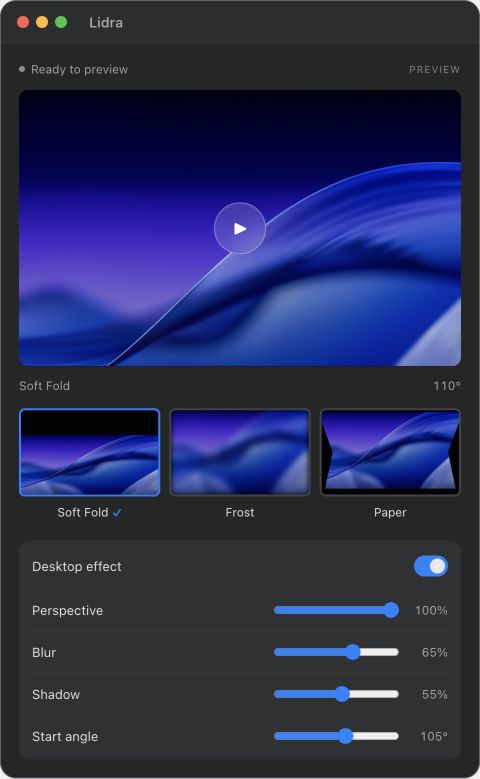
Choose a smooth fold, a soft blur
or a defined paper crease.
Set it your way.
Adjust the available perspective, blur and shadow controls for your chosen style.
You choose when.
Set the lid angle where the effect begins. Preview it in the app, or switch it off anytime.
MADE FOR YOUR MACBOOK
The effect includes your wallpaper, windows, Dock and menu bar on the built-in display.
Your MacBook’s lid sensor controls the effect. Close the app window and Lidra stays available in the menu bar.
Lidra processes screen frames on your Mac without saving or uploading them. It does not capture audio.
ONE-TIME PURCHASE
Requires a lid angle sensor and Screen Recording permission.
Check compatibility and early-access details below.
Lidra requires macOS 14 or later, an Apple silicon MacBook with a lid angle sensor, and the built-in display. It has been tested on an M2 Pro MacBook Pro. Other models have not yet been verified. Intel Macs and external displays are not supported.
Lidra needs an image of your desktop to draw the effect. macOS provides it through Screen Recording permission. The app processes these frames locally without saving or uploading them, and does not capture audio.
Lidra is $1.99 USD as a one-time purchase. All three effects are included and there is no subscription.
Lidra is in early access. The release is signed with Developer ID and notarized by Apple. Screen Recording permission is required to apply the desktop effect. Compatibility testing is still in progress, so please check the supported hardware before buying.